

Key takeaways
- Designing for AI is behaviour design, not a chat box: define autonomy, preview, provenance, undo, and failure around a proposing actor.
- Contracts shift by moment and risk; the same model needs different modes, handovers, and thresholds so people can judge and correct fast.
- Keep policy, thresholds, permissions, and data scope human-owned; the model drafts, ranks, and matches but never sets rules or defaults with risky side effects.
- Earn trust with three surfaces: short human reasons, side-by-side previews of changes, and an obvious, immediate rollback.
- Pick one feature, write a one-paragraph contract, ship a change, then watch time-to-first-correct and reversal-within-30-seconds to adjust autonomy.
Designing for AI is not designing a chat box; it is choosing how much trust to ask for, how errors will look, and what the person controls versus what the machine handles. Those are product psychology and behaviour design decisions with a new actor that proposes and acts. The tool that writes, classifies or generates executes; it does not decide why. Your job is to set the boundaries and be able to defend them.
A chat interface can be the right surface, but it never settles the hard parts. The same assistant in three products needs three different contracts, because the moment and the risk change what you may ask of the person. An email drafter can guess and be corrected; a finance tool cannot.
Behaviour design with a new actor
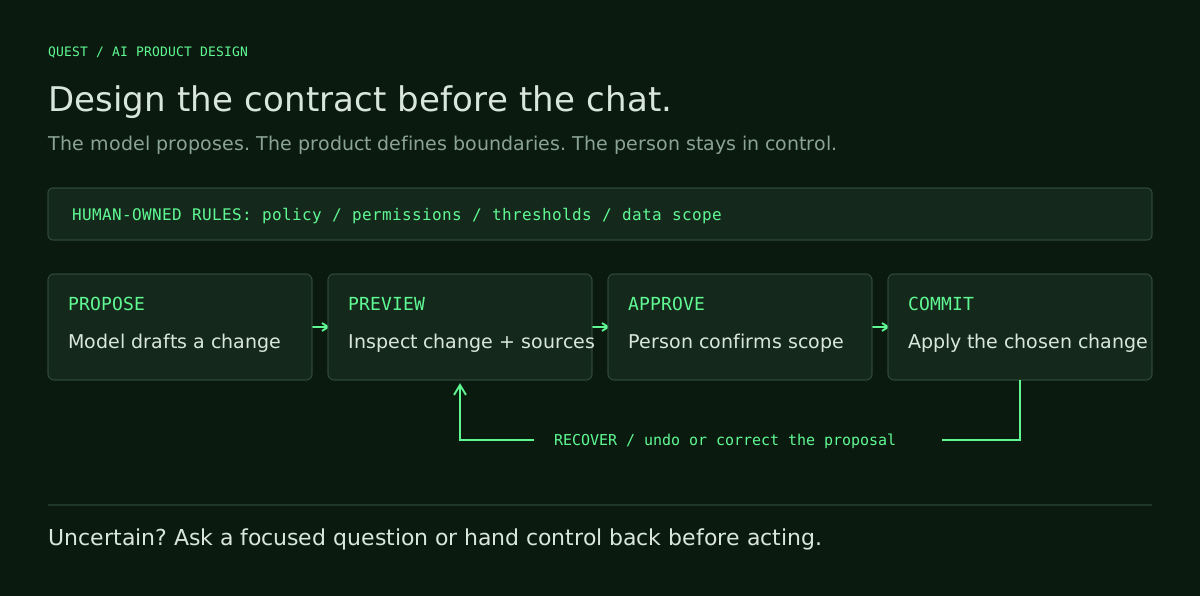
AI UX is behaviour design with an actor that proposes actions, not only reacts. That shifts the work from “collect input and show results” to “calibrate trust, route mistakes and stage control.” You design phases—observe, propose, preview, commit, recover—and the handovers across them.
The right question is not “how do they ask?” but “how fast do they need to be right?” When the primary fear is being wrong in public, the contract needs a strong preview, visible provenance and an obvious undo. When the fear is wasting time, it needs sensible defaults and one-tap acceptance. The same model can power both; the difference is the behaviour you wrap around it.
The concrete moment that sets the contract
Picture a support lead five minutes before stand-up. Fifty new tickets, a backlog that scares them, and a simple goal: triage that sticks. A model can read tone and urgency, draft labels and propose templates, but the contract cannot be “trust me blindly,” because a misrouted outage ticket is expensive.
In that moment, the job is to pre-draft everything and ask for a single confirm per block, with a reason the lead can scan and accept in a second. Confidence should appear as a short human rationale and the features that drove the proposal, not a raw score. Corrections need to be one-tap reversals. If the product supports session memory, make clear whether a correction affects later proposals; never imply learning that is not implemented.
That moment yields three patterns: limited autonomy with preview-before-commit, visible provenance for hard calls, and a correction loop that learns locally in-session. The lead does not want to write prompts; they want to be out of the hole in three minutes. Your design is the control surface that makes that possible without asking for blind trust.
Four decisions before any chat
Before you sketch an input, decide four things you can state in one line each. First, the level of autonomy by moment: will the system only observe, propose with edits, auto-apply with preview, or auto-apply with rollback, and when does it shift? Second, confidence and provenance: how will uncertainty show, what sources or features will be cited, and how fast can a person judge them?
Third, correction and rollback: what is the smallest unit you can undo, how obvious is that affordance, and does a correction teach the system locally or globally? Fourth, failure shape: when the model is unsure, does it show a safe fallback, ask a targeted question, or defer to a human, and how does that appear in the flow? These four answers drive every screen you draw.
Treat chat as intake where it shines: intent discovery, quick rewriting, or idea shaping. For anything with state changes, external data, or consequences, prefer “draft, preview, commit” with clear units and reversible steps. That visible structure reduces fear, which is the friction you must name first.
What never to delegate to the model
A model can propose, rank and label; it should not set your business policy. Pricing rules, permission boundaries, legal commitments and who sees what are product decisions. Do not hand them to the assistant and hope it infers your intent. The edge is not capability; it is accountability, and your users expect you to own it. That line is why safe systems last.
Keep the assistant on drafting and matching; keep humans and the product in charge of thresholds, final gates and data scope. If “urgent” triggers on-call, a person or a fixed rule sets the threshold; the assistant surfaces candidates and evidence. This is the core split in what to never let AI decide, and it is how you defend the design.

Try this contract on the sample brief before choosing a pattern.
Trust is earned in three surfaces
Trust is not a banner that says “AI inside”; it is a sequence of surfaces that reduce doubt at the right time. The first is the “why” surface: a short, human-parsable reason with just enough provenance to earn a two-second scan. The second is the “preview” surface: show the change before it lands, side by side when possible, with clear highlights.
The third is “reversal”: make undo the most obvious control in the place the eye lands after commit. Those three surfaces reduce three fears: “is this arbitrary?”, “what will it change?”, and “can I get back?” When they exist, acceptance rises without telling people to trust the AI. When they are missing, people slow down, rework the output, or abandon the assistant.
Metrics that prove the contract
When you design for AI, the numbers you watch change. Acceptance rate alone is not the signal. Track acceptance-without-edit for low-risk tasks and acceptance-after-quick-edit for writing. Time-to-first-correct is stronger than time-to-first-output because it measures when the person can move on, not when the model starts typing.
Reversal-within-30-seconds is a proposed diagnostic window, not a universal benchmark. A rise can suggest overreach or an unclear preview; inspect the reasons before drawing a conclusion. Correction-loop use matters more than generic “feedback submitted.” Measure whether in-session corrections reduce edits in the next few items; that tells you if the loop helps in the moment that matters.
Two more metrics expose distrust in practice: deferral rate to human fallback, and misuse rate where people route around the AI to get work done. Check whether either drops after changing the contract. If they do not, do not tune prompts first. Fix autonomy, preview and undo, then revisit the model. The behaviour is yours to design; the model is an ingredient.
Patterns, workflow, and practice
Some patterns become everyday tools because they generalise across products. A clear mode switch between suggestive and auto-apply-with-preview. Late binding with batch commit so people can stage several proposals and commit once with one rollback. Scoped memory that learns in-session, plus a clean “make this my rule” affordance to elevate a finding to policy.
Add confidence that speaks human—short reasons and sources, not raw probabilities—with a clear branch for “low-confidence, ask me.” Use interruptible latency: optimistic UIs that allow scanning and correction while generation finishes, without jamming the thread. You will not need every pattern on every screen; the skill is picking the one that reduces the fear in front of you.
These choices slot into an AI product workflow for designers: declare risk bands, autonomy levels and fallback shapes early. That gives you a shared language with engineering and helps you choose model capabilities without bending the product around a demo. The inverse—starting from a model trick—is how features turn into toys.
Three skills carry the load as you move from product designer to AI designer. First, product psychology and behaviour design: name the moment, the action, and the fear; then pick the pattern that reduces it. You can train it as a quick diagnostic and reinforce it with the discipline of mental simplicity, which cuts decision cost by eliminating indecision.
Second, defensible UX judgment: write down why this autonomy level is safe here and not there, and prove it. Run short A/Bs that isolate a pattern—compare auto-apply-with-rollback versus preview-before-commit—and argue from time-to-first-correct, acceptance-without-edit and reversal-within-30. Third, learn to direct AI under product rules you own rather than compete with it.
Practice writing instructions that set scope, cite sources and respect thresholds. Know the outer limits so you do not ask for magic. The useful boundary read is in what AI can’t do in design. Explore the skills library to choose what to practise next.
Put the contract into practice
Chat still works for open-ended exploration and drafting. Even then, you set defaults, inject context and cap overreach; you do not leave a blank canvas and hope the model gets lucky.
The line appears anywhere with roles, permissions, multi-step effects or irreversible actions. A chat that moves money or changes access without preview and rollback is a liability. When you see it proposed, run the same read: moment, fear, action, pattern. You will name a surface that carries accountability on purpose.
Pick one AI feature in your product and write its contract in a paragraph: autonomy by moment, what preview shows, how undo works, and how uncertainty appears. Ship one change that alters behaviour, not banner copy. Then watch reversal-within-30-seconds for a week and adjust autonomy once. If you want a neutral scenario with measurable targets, try the practice brief at the sample brief.
You are a senior AI product designer. Use behavior design, not chat-first. Ask me to confirm or fill these fields: [product/feature], [user moment and fear], [risk and reversibility], [data sources], [human-owned policies/thresholds/permissions], [desired autonomy by moment], [uncertainty fallback]. Output: 1) One-paragraph AI feature contract covering autonomy by moment (observe/propose/auto-apply+preview/auto-apply+rollback), preview contents and units of change, undo granularity and time windows, uncertainty display as human rationale with sources (no raw scores), provenance surface, in-session correction loop, and visible mode. 2) A minimal metric plan with targets for time-to-first-correct, acceptance-without-edit vs after-quick-edit, reversal-within-30-seconds, and deferral/misuse. Constraints: Do not let the model set policy, thresholds, or permissions; keep defaults safe by construction; prefer draft–preview–commit for state-changing actions; design for fast scanning and one-tap reversals. If any field is unclear, ask pointed questions first, then produce the outputs.
Frequently asked questions
How do I pick the right autonomy level for my AI feature?
Start from risk and reversibility in the user’s moment. If errors are costly or public, use preview-before-commit; if low risk and time-pressed, consider auto-apply-with-rollback. Make the mode obvious. A/B preview-before-commit versus auto-apply-with-rollback and watch reversal-within-30-seconds and time-to-first-correct. Declare risk bands and fallbacks up front using the workflow in AI product workflow.
What does good provenance look like in an AI UI?
Show a short, human reason with the few features or sources that drove the proposal, placed beside the action. Avoid raw probabilities. Let people expand to a sentence, not a modal stack. Make it scannable in two seconds. Keep the explanation mentally simple so it lowers decision cost; the guidance in mental simplicity helps you cut wording and noise.
Which metrics tell me the contract works better than acceptance rate?
Track time-to-first-correct, acceptance-without-edit for low-risk tasks, acceptance-after-quick-edit for writing, and reversal-within-30-seconds for overreach or weak previews. Add in-session correction effectiveness (do next items need fewer edits?), plus deferral and misuse rates. Set a baseline, change one autonomy or preview element, then read these signals before touching prompts or models.
When should I use chat versus a structured draft–preview–commit flow?
Use chat for intent discovery, quick rewriting, or idea shaping. Switch to draft–preview–commit when actions change state, touch external data, involve roles or permissions, or risk irreversible effects. Provide rollback and clear units of change. Keep policy and thresholds human-owned; the boundaries in what to never let AI decide and the workflow in AI product workflow make the split concrete.
What decisions should I never delegate to the model?
Do not let the model set business policy, pricing rules, permission boundaries, legal commitments, default actions with risky side effects, or data scope. The model can draft, rank, and match; humans own thresholds and gates. Keep the line bright so you can defend outcomes. The detailed list and rationale are in what to never let AI decide.