
Key takeaways
- UX design practice now starts where the model stops: a correct, generic draft and sixty minutes to beat it with one decision you can defend.
- Beating the draft means one decision it did not make, tied to the brief's number, with the rest of the draft kept on purpose.
- Keep the familiar patterns: a convention learned in other products costs the user almost nothing, so novelty has to earn its cost.
- Set it up yourself: a brief with a number, a plain draft frozen before the clock starts, one sentence in ten minutes, three lines at the end.
- Score each session with three yes-or-no checks, never with how much better the screen looks.
UX design practice used to start from a blank canvas, because that is where the work used to start. In 2026 it rarely does. A model hands a client a competent first draft in minutes, so the job a designer is hired for begins one step later: looking at a screen that is correct and generic, and deciding what to change, what to keep and why.
That is the exercise worth practising. Put a conventional AI draft in front of you, give yourself sixty minutes and beat it with one decision you can defend in writing. It is closer to a real week than any blank-page challenge, and it trains the half of the work the model does not do. Here is how to set it up on your own, and how to know whether you won.
Why the blank canvas trains the wrong half
A blank-canvas challenge rewards what you can produce from nothing: a layout, a type system, a convincing hero. A model now produces those by default, and its default is good: the most probable screen is the average of every screen like it, competent and forgettable at once. Practising only that part means competing with the model on its own ground.
Real projects rarely start blank either. There is a live page, a bought template or a draft somebody generated last night, and the first thing a team needs from you is an honest read of it: what works, what the brief says is failing, and which single change would move the number. A draft to beat puts that read at the start of every session.
What a draft to beat looks like
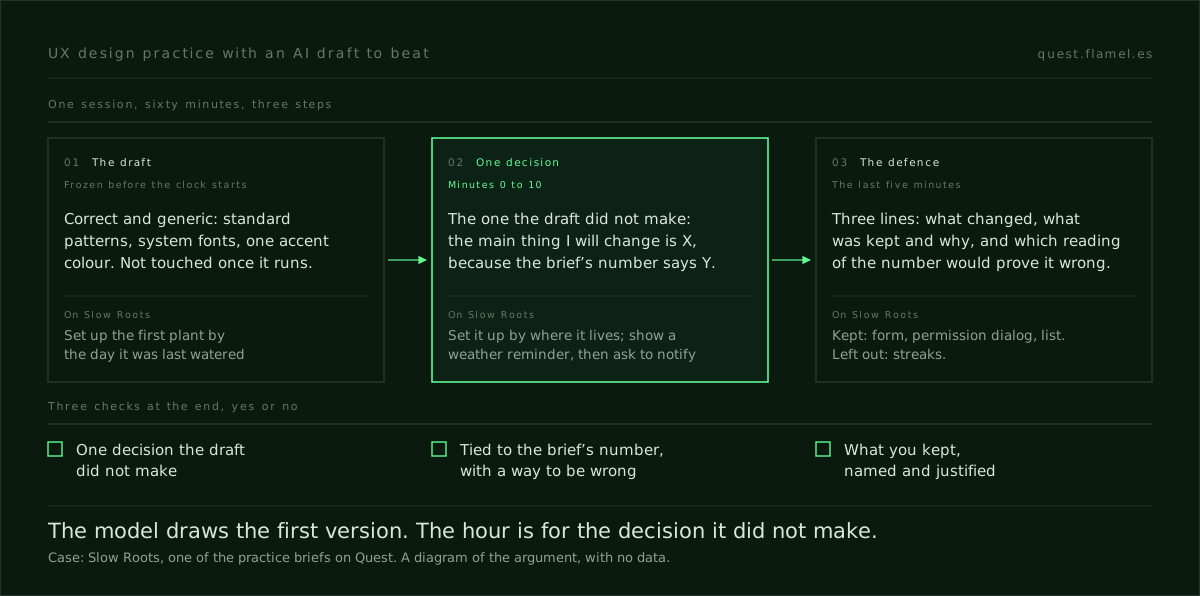
Take Slow Roots, one of the practice briefs on Quest: a plant shop in Copenhagen with two stores and a small companion app. Customers download the app after buying a plant in store, motivated and a little anxious, and within a week 60% of them stop opening it. The objective is a first-run onboarding that keeps seven-day retention above 60%, without making a nervous new owner feel nagged.
The starting design is a standard utility onboarding: a welcome screen, a form to add your first plant with its name, its type and the day it was last watered, a prompt to turn on notifications, and a home screen that lists your plants. Nothing in it is wrong. Every pattern is one the owner has already used in other apps, and that is exactly what makes it hard to beat.
It is also what makes the exercise honest. A bad draft lets any change look like a win; a correct one makes you find the decision it did not make, the one thing a client cannot get from the same model in another tab. For the same read applied to a launch page, what to hand the model and what to decide yourself takes the Cassette Futurism draft apart step by step.
What beating the draft means
Beating the draft is not a better-looking version of it. It is one decision the draft did not make, tied to the number in the brief, with the rest of the draft kept on purpose. On Slow Roots it hides in a single form field.
Asking when the plant was last watered sets everything up by date, so the reminders that follow run on a schedule. The brief says owners hate apps that tell them to water every Tuesday, and the shop's difference is reminders that follow the local weather. One decision that beats the draft: set the first plant up by where it lives, which window and how much light, and show its first weather-based reminder before asking for notifications.

Then write down what you kept, and why. The form controls stay standard, the permission dialog stays the platform's own and the plant list stays a list. The owner already knows how to operate all three, which is prior familiarity as an ability factor: a pattern learned elsewhere costs almost nothing to use. Inventing a gesture to add a plant would charge a nervous owner a learning cost the brief never asked for.
And write down what you left out. A streak counter is the obvious lever for opens in the first week, and the brief rules it out: the tone is never gamified and never uses streak language, and the owner's pain is the guilt of notifications piling up. Naming that refusal is part of the decision, not a footnote to it.
Try the read once before you set anything up. The sample brief on Quest is a complete brief with brand, problem, number and targeted skills, and needs no account. Picture the generic version its client has today and name, in one sentence, the decision that version did not make. That sentence is most of the session.
How to set it up on your own
You do not need a platform for this. You need a brief with a number, a draft you are not allowed to touch once the clock starts, and an hour.
- Pick a brief with a business behind it: what is sold, who it is for, what is failing and the number that says so.
- Generate the draft from the brief with a plain instruction: one design of the whole flow, standard patterns, system fonts, one accent colour, no alternatives and no rationale. You want the version the client already has, not a sparring partner.
- Freeze it. Save the screens before the clock starts and do not regenerate. Rerolling until the draft looks weak is choosing an easy opponent.
- Start sixty minutes and spend the first ten on one sentence: the main thing I will change is X, because the brief's number says Y. The split of the rest of the hour is the one in how to run a 60-minute design challenge.
- Build on top of the draft, not beside it. Change what the sentence covers and leave the rest alone, however much it itches.
- Stop when the clock does and write three lines: what you changed, what you kept and why, and which reading of the number would tell you that you were wrong.
What it trains, and how to measure it
It trains three things, and none of them is speed: reading a correct screen for the decision it hides, choosing one change and leaving the rest, and defending that change in a sentence someone else can check. A model can help with all of the building in that hour, but not with those three, because each depends on why the work was asked for.
Measure each session with three yes-or-no checks you can answer from the screens and the notes. Is there one decision the draft did not make? Is it tied to the brief's number, with a reading that would prove it wrong? Did you name what you kept and why? A screen that looks better and fails all three is the blank canvas again, in nicer clothes.
Across sessions, time the first sentence. Early on it can take the whole ten minutes; when it starts landing in two or three, the read is turning into a habit. For a month of sessions, a 30-day plan built to replace Daily UI adds a decision note and a weekly review to the same loop.
Why Quest runs it this way every day
Quest is built on this exercise. Every brief ships with a starting design, the generic version the client has today, and the job is to beat it rather than start from a blank canvas. The clock counts down from sixty minutes and keeps counting in overtime: nothing locks, but the number stays honest. You iterate in your own tool, submit the file or a Figma link and write how you applied each targeted skill.
The scoring follows the same logic as the three checks: work is scored on how the targeted skills were applied, not on how the screen looks, and the written explanation is the training, not paperwork after it. The draft is plain on purpose, because a clever opponent would turn the hour into a style contest.
Your next hour
Pick one brief this week, generate its plain draft, freeze it and set the clock. Write the sentence in the first ten minutes, build only what it covers, and close with the three lines. If you would rather not write the brief yourself, start with the sample brief: the brand, the problem, the number and the skills are already there, and the decision is still yours to name.
You are a senior product designer reviewing my practice session. I will paste: [the brief, with the number it has to move], [a description or screenshots of the starting draft], [my one-sentence decision], [what I changed], [what I kept], [what I left out on purpose]. Do not redesign anything and do not suggest a second decision. Answer three questions, each with yes or no and one line of evidence: 1) Is my decision one the draft did not make, or is it the draft with nicer styling? 2) Is it tied to the brief's number, and which reading of that number would show I was wrong? 3) Did I keep the draft's familiar patterns where they work, and is every pattern I replaced worth what it costs a first-time user to learn? Then name the weakest of my three lines and ask me one question that would make it stronger.
Frequently asked questions
How do I set up an AI draft to beat on my own?
Pick a brief with a business behind it and a number that is failing. Ask a model for one plain design of the whole flow: standard patterns, system fonts, one accent colour, no alternatives and no rationale. Save the screens and do not regenerate once the clock starts. Then give yourself sixty minutes, and spend the first ten on one sentence that names the change and the number it should move.
How do I know whether I beat the draft?
Answer three questions from the screens and your notes. Is there one decision the draft did not make? Is it tied to the brief's number, with a reading that would show you were wrong? Did you name what you kept and why? A version that looks better and fails all three has not beaten the draft; it has restyled it.
Should I replace the draft's familiar patterns?
Only when the change pays for itself. A pattern the user already knows from other products costs almost nothing to operate, which is prior familiarity as an ability factor. Keep standard forms, permission dialogs and lists unless the brief's problem lives inside them, and write down why you kept each one, because that line is half of the defence.
What if the AI draft is weak?
Then it is the wrong opponent. A weak draft lets any change look like a win, so you learn nothing about judgement. Regenerate before the clock starts with a plainer instruction, or use the sample brief, which comes with the brand, the problem, the number and the targeted skills already written. Once the clock starts, the draft stays as it is.